
1C Big Keyboard is a virtual keyboard application specifically designed for Android tablets and large-screen devices. It features a spacious, intuitive interface that simplifies typing and navigation on bigger displays. The app allows you to customize key sizes, themes, and gesture controls, enabling a personalized typing experience. With its thoughtful design and robust features, 1C Big Keyboard delivers a comfortable and efficient typing solution for tablet users.
Key Features of 1C Big Keyboard:
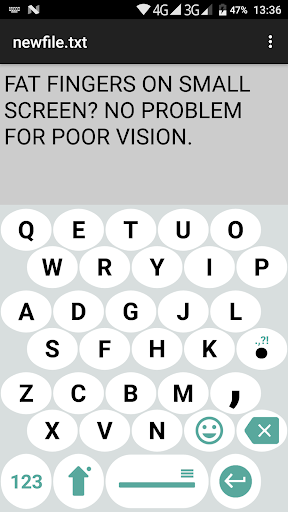
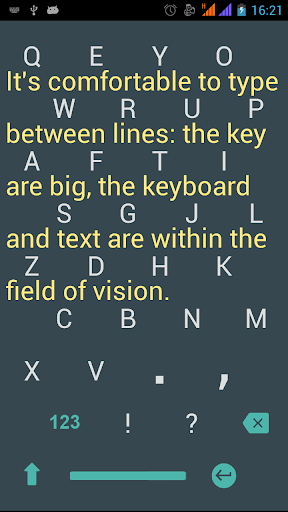
* Large letters and buttons to reduce eye strain and protect vision.
* Easy-to-use interface with quick language switching.
* Swipe gesture mode for sending phrases with stickers.
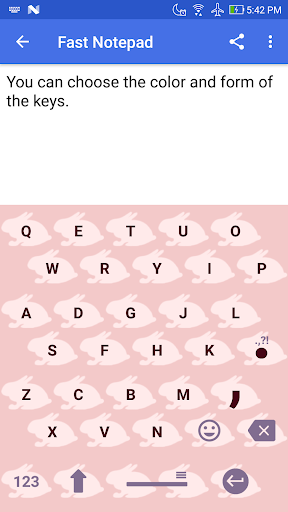
* Option to personalize the keyboard by selecting key shapes.
* Free version includes a wide variety of emoticons.
Vision Awareness at 58
At age 58, I noticed my own vision starting to decline. This personal experience motivated me to develop a solution to meet my needs, starting with a thorough understanding of the challenges people like me encounter.
Challenges with Larger Fingers
In addition to my vision changes, I have larger fingers. It was difficult to find a keyboard that felt comfortable, which inspired me to create one that is both easy to see and well-suited for bigger hands.
A Note for Younger Users
If you're under 35 with perfect eyesight, this keyboard may not be essential now. However, it’s a great option to consider for the future. For your parents who may be facing similar issues, this keyboard could significantly improve their daily digital interactions.
Full-Screen Keyboard Compatibility
Designed for Android, this keyboard fully utilizes your phone’s screen, covering the entire display area to ensure accurate and comfortable tapping and swiping.
Transitioning to Full-Screen Mode
Easily switch between display modes by sliding up the screen. This smooth transition improves usability, making it simple to move between apps and tasks.
Protecting Vision and Reducing Fatigue
This keyboard places a strong emphasis on eye comfort. Its expanded typing area minimizes eye strain, helping you stay focused and reducing overall visual fatigue.
Error-Free Typing
Thanks to its large layout, typing becomes easier and more accurate. The generous key spacing reduces typos, helping you communicate clearly and confidently.
A Simplified Layout for Larger Hands
The layout is smartly condensed from the standard QWERTY design, ensuring a comfortable and effective typing experience even for users with larger hands.
What's New in the Latest Version
Last updated on Sep 9, 2024
- Enhanced custom key functionality in landscape mode.